Define-XML in R with metacore and metatools: Read and Check Submission Metadata
Read a Define-XML submission-metadata file into a metacore object, pull its codelists and value-level specs, and check your ADaM datasets against that spec with metatools — plus the honest boundary of what actually generates a define.xml and how it traces every analysis value back to SDTM
Pharma & Clinical
Define-XML is the machine-readable metadata that describes every dataset, variable, codelist, and derivation in a regulatory submission — the reviewer’s table of contents. This hands-on tutorial reads a real CDISC pilot define.xml into a metacore metadata object, extracts its controlled-terminology codelists and value-level specs, and checks the actual ADaM datasets against that spec with metatools (a controlled-terminology PASS and a real FAIL). It draws the honest boundary — metacore reads a define.xml, it does not write one; generation is Pinnacle 21 or the open-source defineR package — and shows the traceability payoff: how the value-level metadata links each analysis value back to its SDTM source. On the public CDISC pilot metadata and pharmaverse data, so every line runs.
TipKey takeaways
- Define-XML is the machine-readable metadata that describes your submission datasets — datasets, variables, value-level metadata, controlled-terminology codelists, and derivations. It is the reviewer’s table of contents, and v2.1 is the current version.
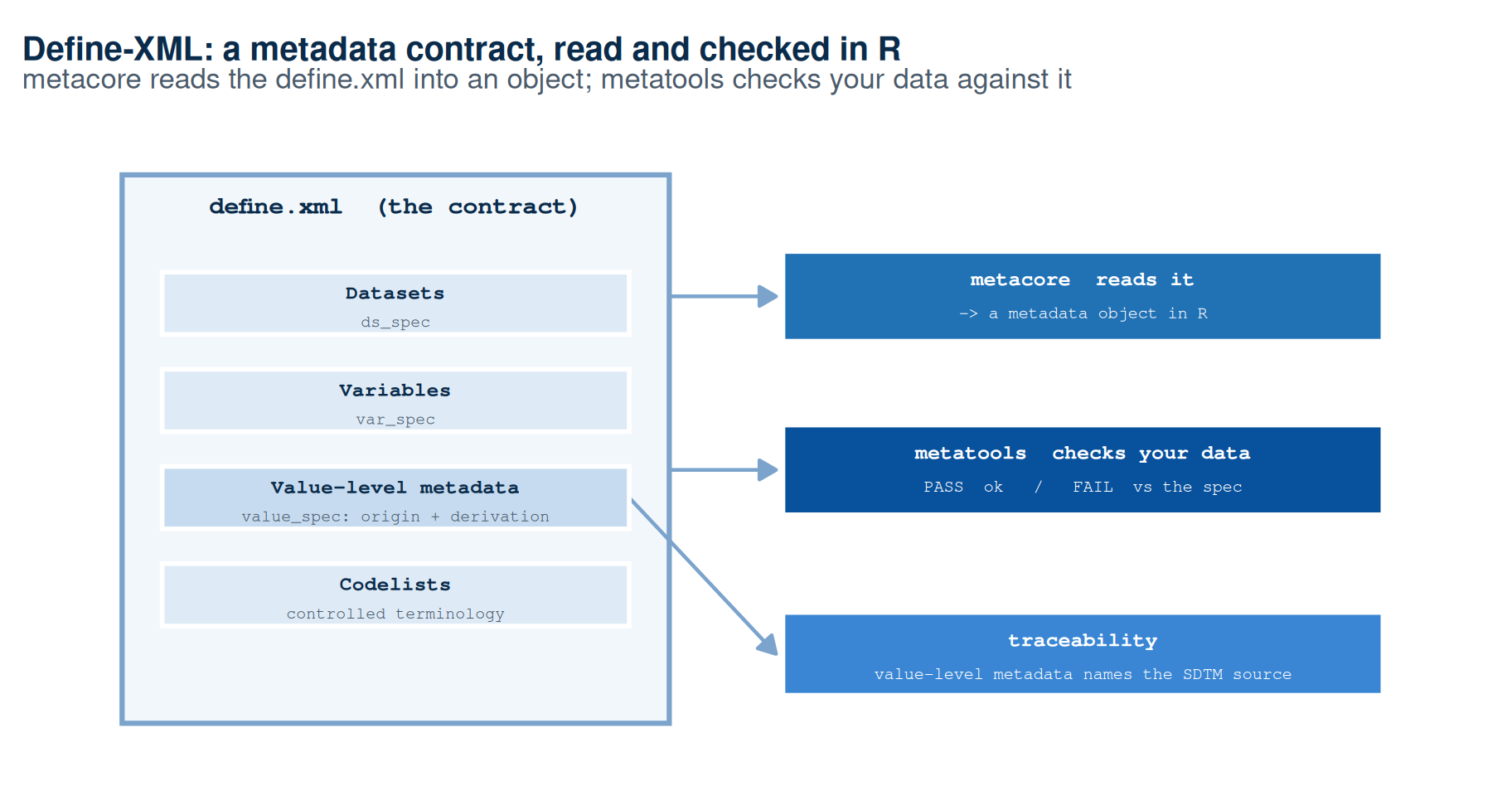
metacoreREADS a define.xml into a structured object; it does not write one.define_to_metacore()turns adefine.xmlinto seven tidy tables you can query in R (ds_spec,var_spec,value_spec,codelist,derivations, …).metatoolsCHECKS your data against that spec.check_ct_col()andcheck_ct_data()verify a variable’s values against its codelist;check_variables()verifies the dataset has the right columns — the conformance loop where the define.xml is the contract and the data is checked against it.- What actually generates a define.xml is other tooling — the industry standard Pinnacle 21 (Excel spec → define.xml, supports v2.1) or the open-source R package defineR (spreadsheet-driven, currently v2.0-oriented).
metacore/xportrnever write it — be precise about the boundary. - Define-XML is where traceability lives. The
value_specrecords each variable’soriginandderivation_id, andderivationsholds the plain-text logic that names the SDTM source — so a reviewer can trace an ADaM analysis value back to the collected data without opening code.
Introduction
You have a folder of XPT (SAS Transport version-5) datasets ready to ship. A reviewer who opens them sees columns named USUBJID, TRT01P, AVAL — terse, standardized, and on their own almost meaningless. What turns that folder into a reviewable submission is the file that describes it: Define-XML (short for the Case Report Tabulation Data Definition, define.xml), the machine-readable metadata that lists every dataset, every variable, its type and codelist, and how each analysis value was derived. A reviewer opens the Define-XML first — it is the roadmap to everything else.
This lesson is about working with that metadata in R. You will read a real define.xml into a structured object with the metacore package, pull out its codelists and specs, then check your actual datasets against it with metatools. Along the way, one point matters more than any function call: metacore reads a define.xml — it does not write one. We will be exact about what generates the file, and finish on the reason the whole format exists: traceability from an analysis value back to its SDTM (Study Data Tabulation Model) source.
The companion lesson exported the .xpt datasets; this one is the metadata that travels beside them.
What Define-XML is: the reviewer’s data dictionary
Define-XML is a CDISC (Clinical Data Interchange Standards Consortium) standard for describing tabulation and analysis datasets as machine-readable metadata. One define.xml file per standard (one for SDTM, one for ADaM — the Analysis Data Model) records, for every dataset it covers:
- the datasets and their structure (one record per subject, per parameter, …);
- every variable, with its type, length, label, and display format;
- value-level metadata — metadata that varies by row, not just by column (an ADaM
AVALmeans one thing whenPARAMCD = "ACTOT"and another when it is a single item score); - codelists — the controlled terminology (CT) a variable’s values must come from (the set of allowed treatment arms, age groups, sexes);
- derivations and origin — where each value came from and the rule that produced it.
It ships with an XSL stylesheet that renders it as a readable define.html, so a human can browse the same metadata a validation tool consumes. It is required by the FDA and PMDA (Japan’s Pharmaceuticals and Medical Devices Agency) for a submission — an ADaM package must include a define.xml alongside its datasets, named in the FDA’s Study Data Standards Resources. The current version is Define-XML v2.1 (CDISC Define-XML v2.1; v2.0 is the prior version still seen in older submissions).
The rest of this lesson works with a real one. CDISC ships an example define.xml from its public pilot inside the metacore package, so every block below runs against genuine submission metadata.
Read a define.xml into R with metacore
metacore turns a define.xml into a tidy, queryable object. define_to_metacore() parses the file; printing the result summarizes the datasets it covers.
Note
Pass verbose = "silent" to keep the parse quiet — not quiet = TRUE, which is deprecated and will warn.
library(metacore)

# CDISC's public pilot ADaM define.xml, bundled with metacore
path <- metacore_example("ADaM_define_CDISC_pilot3.xml")
mc   <- define_to_metacore(path, verbose = "silent")
mc
The object holds metadata for the pilot’s five ADaM datasets. Under the hood it is a set of seven tidy tables you can pull out by name — the whole define.xml, unpacked into data frames:
| Table | What it holds |
|---|---|
ds_spec |
one row per dataset — name, structure, label |
ds_vars |
dataset ↔︎ variable membership, with key order, mandatory, and core status |
var_spec |
one row per variable — type, length, label, format |
value_spec |
value-level metadata — per variable: origin, derivation_id, code_id, where |
codelist |
the controlled-terminology codelists — allowed values per code_id |
derivations |
derivation_id → the plain-text derivation logic |
supp |
supplemental qualifiers (empty for this define) |
Look at the dataset-level table to see the structure declarations the define records:
library(metacore)

path <- metacore_example("ADaM_define_CDISC_pilot3.xml")
mc   <- define_to_metacore(path, verbose = "silent")

mc$ds_spec
# A tibble: 5 × 3
dataset structure label
<chr> <chr> <chr>
1 ADSL one record per subject. Screen Failures are excluded. Subj…
2 ADADAS one record per subject per parameter per analysis visit per ana… ADAS…
3 ADLBC one record per subject per parameter per analysis visit Anal…
4 ADTTE one record per subject per parameter AE T…
5 ADAE one record per subject per adverse event Adve…ADSL (the Subject-Level Analysis Dataset — one row per subject) is declared as “one record per subject. Screen Failures are excluded” — a structure statement that is itself part of the contract.
To work with metatools, you first subset to one dataset with select_dataset(). That gives you a dataset-scoped metadata object the checks read from:
library(metacore)

path    <- metacore_example("ADaM_define_CDISC_pilot3.xml")
mc      <- define_to_metacore(path, verbose = "silent")
adsl_mc <- select_dataset(mc, "ADSL", verbose = "silent")

class(adsl_mc)
[1] "DatasetMeta" "Metacore" "R6" Pull out a codelist
A codelist is the controlled terminology a variable’s values must belong to. Reach into it with get_control_term() — pass the variable unquoted and it returns the allowed code/decode pairs (the codelist table stores codes in a list-column, so this accessor is the clean way in):
library(metacore)

path <- metacore_example("ADaM_define_CDISC_pilot3.xml")
mc   <- define_to_metacore(path, verbose = "silent")

get_control_term(mc, TRT01P)   # planned treatment arm — the permitted values
# A tibble: 3 × 2
code decode
<chr> <chr>
1 Placebo Placebo
2 Xanomeline Low Dose Xanomeline Low Dose
3 Xanomeline High Dose Xanomeline High Doseget_control_term(mc, AGEGR1) # pooled age group# A tibble: 3 × 2
code decode
<chr> <chr>
1 <65 <65
2 65-80 65-80
3 >80 >80 TRT01P (Planned Treatment for Period 01) is allowed exactly three values — Placebo, Xanomeline Low Dose, Xanomeline High Dose. Anything else in your data is, by definition, a controlled-terminology violation. That is the contract the next step enforces.
Check your data against the spec with metatools
Now the conformance loop: the define.xml is the contract, and metatools checks whether your actual dataset honours it. We use a real ADaM subject-level dataset from pharmaverseadam.
Important
A deliberate, honest mismatch. The pharmaverseadam ADSL is a newer admiral build than the pilot-3 define.xml, so it legitimately carries some values and columns the pilot define never declared. That is not a metacore bug — it is exactly the discrepancy a conformance check exists to surface. We use it to show the FAIL path with real output, not a contrived error.
Start with a variable that conforms. check_ct_col() verifies one column’s values against its codelist; when everything conforms it returns the data invisibly with no warning:
library(metacore)
library(metatools)

path    <- metacore_example("ADaM_define_CDISC_pilot3.xml")
mc      <- define_to_metacore(path, verbose = "silent")
adsl_mc <- select_dataset(mc, "ADSL", verbose = "silent")
data("adsl", package = "pharmaverseadam")

# SEX conforms to its codelist -> returns the data, no warning
checked <- check_ct_col(adsl, adsl_mc, SEX)
nrow(checked)
[1] 306No warning: every value of SEX is in the permitted codelist (M/F). Now check TRT01P. The pharmaverseadam build includes screen-failure subjects the pilot define excludes, so a value appears that the CL.ARM codelist does not permit — and the check flags it:
library(metacore)
library(metatools)

path    <- metacore_example("ADaM_define_CDISC_pilot3.xml")
mc      <- define_to_metacore(path, verbose = "silent")
adsl_mc <- select_dataset(mc, "ADSL", verbose = "silent")
data("adsl", package = "pharmaverseadam")

# TRT01P carries a value not in the define's codelist -> a warning
invisible(check_ct_col(adsl, adsl_mc, TRT01P))
Warning: ✖ Invalid controlled terminology detected
ℹ Variable: TRT01P | Codelist: CL.ARM
ℹ Values not permitted 'Screen Failure'The warning names the variable, the codelist (CL.ARM), and the offending value. To get the bad values back as data — to log them, count them, or drive a fix — use get_bad_ct():
library(metacore)
library(metatools)

path    <- metacore_example("ADaM_define_CDISC_pilot3.xml")
mc      <- define_to_metacore(path, verbose = "silent")
adsl_mc <- select_dataset(mc, "ADSL", verbose = "silent")
data("adsl", package = "pharmaverseadam")

get_bad_ct(adsl, adsl_mc, TRT01P)   # the values not permitted by the codelist
[1] "Screen Failure"get_bad_ct(adsl, adsl_mc, SEX) # character(0) -> SEX is cleancharacter(0)"Screen Failure" is the value the newer build carries and the pilot define does not permit; SEX returns character(0) — nothing wrong. In a real study you would resolve this by aligning the data to the define (or updating the define to match the analysis population). To sweep every controlled-terminology column at once instead of one at a time, check_ct_data(adsl, adsl_mc) runs the same check across the whole dataset and warns per offending column.
Controlled terminology is one half of conformance; the other is structural — does the dataset have the columns the spec expects? check_variables() compares the dataset’s columns to the spec and reports what is missing or extra:
library(metacore)
library(metatools)

path    <- metacore_example("ADaM_define_CDISC_pilot3.xml")
mc      <- define_to_metacore(path, verbose = "silent")
adsl_mc <- select_dataset(mc, "ADSL", verbose = "silent")
data("adsl", package = "pharmaverseadam")

invisible(check_variables(adsl, adsl_mc))
Warning: In: [check_variables(adsl, adsl_mc)]
The following variables are missing: SITEGR1, TRT01PN, TRT01AN, AVGDD, CUMDOSE,
AGEGR1N, AGEGR2, AGEGR2N, RACEN, ITTFL, EFFFL, COMP8FL, COMP16FL, COMP24FL,
DISCONFL, DSRAEFL, BMIBL, BMIBLGR1, HEIGHTBL, WEIGHTBL, EDUCLVL, DISONSDT,
DURDIS, DURDSGR1, VISIT1DT, VISNUMEN, RFENDT, DCDECOD, DCSREAS, MMSETOT
The following variables do not belong: COUNTRY, RFXSTDTC, RFXENDTC, RFPENDTC,
SCRFDT, FRVDT, DTHDTC, DTHADY, LDDTHELD, LDDTHGR1, DTH30FL, DTHA30FL, DTHDOM,
DTHB30FL, REGION1, DMDTC, DMDY, RACEGR1, ARMCD, ACTARM, ACTARMCD, TRTSDTM,
TRTSTMF, TRTEDTM, TRTETMF, EOSDT, RFICDTC, RANDDT, LSTALVDT, DTHDT, DTHDTF,
DTHCAUS, DTHCGR1, BRTHDTCThe report lists the ADSL variables the pilot define declares that this newer build does not carry (SITEGR1, TRT01PN, BMIBL, …). Again, this is the intended value of the check, not a failure of the tool: it names exactly which spec variables are absent, so you can reconcile the dataset and its declared metadata before the file ever reaches a reviewer. Together, check_ct_*() and check_variables() are the conformance loop — the spec is the contract, the data is the evidence, and the check tells you where they disagree.
What actually writes a define.xml (and what does not)
Here is the point to get exactly right, because it is easy to overstate. metacore reads a define.xml; it does not write one. Neither does metatools, and neither does xportr (which exports the .xpt datasets). They consume metadata; they do not generate the define.xml file. If a workflow claims “R writes the define.xml with metacore,” it is wrong.
Generating a define.xml is a separate job, and in practice it is driven from a metadata spreadsheet, not from your analysis code:
| Tool | What it is | Define-XML version | How it works |
|---|---|---|---|
| Pinnacle 21 (Community / Enterprise) | The industry-standard validator and generator | Supports v2.1 | Reads an Excel metadata spec, generates and validates the define.xml. CDISC’s own pilot define files come from this spreadsheet-driven lineage. |
| defineR | Open-source R package (on CRAN) | Currently v2.0-oriented | write_metadata() creates a spreadsheet template → you fill it → write_define() produces the define.xml (plus HTML/PDF). Spreadsheet-driven, not wired to metacore. |
metacore / metatools / xportr |
The pharmaverse read/check/export tools | — (read only) | Do not generate a define.xml. metacore reads it; metatools checks data against it; xportr writes the .xpt. |
So the honest picture: the define.xml is authored from a metadata spec — typically to Define-XML v2.1 via Pinnacle 21, or with the open-source defineR (currently v2.0-oriented) — and then metacore reads it back in for checking and traceability, which is what this lesson does. The R Consortium’s public Pilot 3 submission built its ADaM datasets in R with admiral, metacore/metatools, and xportr, but its define.xml was produced from a metadata spec through this spreadsheet-driven route, not written by the R analysis code.
Trace an analysis value back to SDTM
The deepest reason Define-XML exists is traceability: a reviewer should be able to take any analysis value and trace it back to the collected source data and the rule that produced it — without opening a line of code. That information lives in the value-level metadata, and metacore surfaces it programmatically.
Two tables carry it. value_spec records, per variable, its origin (derived, assigned, collected, …) and a derivation_id; derivations maps that id to the plain-text rule. Join them and you can read the lineage of an analysis value straight from the metadata:
library(metacore)

path <- metacore_example("ADaM_define_CDISC_pilot3.xml")
mc   <- define_to_metacore(path, verbose = "silent")

# The value-level metadata for a few ADADAS analysis variables: origin + which rule made them
vs    <- mc$value_spec
trace <- unique(vs[vs$dataset == "ADADAS" & vs$variable %in% c("AVAL", "ADY", "ADT"),
                   c("variable", "origin", "derivation_id")])
trace
# A tibble: 4 × 3
variable origin derivation_id
<chr> <chr> <chr>
1 ADY derived MT.ADADAS.ADY
2 ADT derived MT.ADADAS.ADT
3 AVAL derived MT.ADADAS.AVAL
4 AVAL derived MT.ADADAS.AVAL.ACTOT# The plain-text derivation logic those ids point to
mc$derivations[mc$derivations$derivation_id %in% trace$derivation_id, ]# A tibble: 4 × 2
derivation_id derivation
<chr> <chr>
1 MT.ADADAS.ADT "SAS date from QS.QSDTC"
2 MT.ADADAS.ADY "ADY = ADT - TRTSDT + 1, if ADT>=TRTSDT. ADY =\nADT - TR…
3 MT.ADADAS.AVAL "QS.QSSTRESN where QSTESTCD=PARAMCD"
4 MT.ADADAS.AVAL.ACTOT "Sum of ADAS scores for items 1, 2, 4, 5, 6, 7, 8, 11, 1…Read the two tables together. ADADAS.AVAL has origin = "derived" and a rule that says QS.QSSTRESN where QSTESTCD=PARAMCD — the analysis value comes straight from the SDTM QS (Questionnaires) domain’s standardized result. ADT is a “SAS date from QS.QSDTC”, and ADY is ADT - TRTSDT + 1 — each derivation names the SDTM source variable it reads. That is the ADaM→SDTM link, in metadata form: the define.xml maps every analysis value to the collected data and the transformation between them. Reproducibility and traceability are not a promise in a document — they are structured metadata a tool can walk, which is exactly what a reviewer (or your own QC) does.
🟢 With an AI agent
Ask Prova “I have a define.xml and a set of ADaM datasets — read the define into R with metacore and check my TRT01P and SEX values against its codelists with metatools.” — it answers grounded in this pillar’s lessons, with runnable pharmaverse code you can try on example data. The runtime is the judge. Ask Prova →
Common issues
define_to_metacore() or select_dataset() warns about a deprecated quiet argument. These functions took a quiet = argument in older versions; it is deprecated. Use verbose = "silent" to suppress the progress messages (the other levels are "message" — the noisy default — "warn", and "collapse"). Passing quiet = TRUE still works but prints a deprecation warning.
A .rda metacore example won’t load with load_metacore(). metacore ships two kinds of example: an XML define (ADaM_define_CDISC_pilot3.xml, read with define_to_metacore()) and a saved metacore object (pilot_ADaM.rda). The .rda is a base R save — restore it with base load() (it recreates an object named metacore), not load_metacore(), which is for .rds files written by save_metacore() and errors with “unknown input format” on an .rda. Match the loader to the file.
Expecting metacore (or xportr) to write the define.xml. They do not. metacore reads a define.xml and metatools checks data against it; generating the file is Pinnacle 21 or the open-source defineR package, driven from a metadata spreadsheet. If your pipeline needs to produce a define.xml, reach for one of those — not for metacore.
Frequently asked questions
NoteWhat is Define-XML?
Define-XML is a CDISC standard for describing submission datasets as machine-readable metadata. One define.xml file per standard (SDTM, ADaM) lists every dataset and variable, its type and length, the controlled-terminology codelists its values must come from, value-level metadata, and the derivations and origins that produced each value. It ships with a stylesheet that renders it as a readable page, and it is required by the FDA and PMDA for a submission — the reviewer’s data dictionary and roadmap. The current version is Define-XML v2.1.
NoteHow do I read a define.xml in R?
Use the metacore package: mc <- define_to_metacore("define.xml", verbose = "silent"). That parses the file into a structured object holding seven tidy tables (ds_spec, ds_vars, var_spec, value_spec, codelist, derivations, supp). Subset to one dataset with select_dataset(mc, "ADSL", verbose = "silent") before checking data, and pull a codelist with get_control_term(mc, TRT01P). Use verbose = "silent", not the deprecated quiet = argument.
NoteWhat generates a define.xml file?
Not metacore or xportr — they only read metadata and export datasets. A define.xml is generated from a metadata spreadsheet, typically by Pinnacle 21 (the industry-standard tool, supports Define-XML v2.1) or by the open-source R package defineR (write_metadata() → fill the template → write_define(); currently v2.0-oriented). The CDISC pilot define files come from this spreadsheet-driven lineage. metacore then reads the finished define.xml back in for checking and traceability.
NoteWhat is the difference between metacore and metatools?
metacore reads and holds the metadata — it parses a define.xml (or a spec spreadsheet) into a structured object you can query for datasets, variables, codelists, and derivations. metatools acts on data using that metadata — it checks your datasets against the spec (check_ct_col(), check_ct_data(), check_variables(), get_bad_ct()) and helps build variables from it. In short: metacore is the metadata; metatools is the toolbox that applies it to your data.
NoteWhat is value-level metadata in Define-XML?
Value-level metadata is metadata that varies by row, not just by column. In ADaM, a single variable like AVAL (analysis value) means different things for different parameters — one PARAMCD is a total score, another is an individual item — so the define.xml records the type, origin, derivation, and codelist per value, keyed by a where condition (e.g. where PARAMCD = "ACTOT"). In metacore it lives in the value_spec table (origin, derivation_id, code_id, where), and it is what lets a reviewer trace each analysis value back to its specific source and rule.
Test your understanding
ImportantYour turn: read a codelist and check a column
Using the bundled pilot define, (1) read ADaM_define_CDISC_pilot3.xml into a metacore object, (2) pull the codelist for AGEGR1 and note its permitted values, (3) subset to ADSL and use metatools to check the pharmaverseadam adsl dataset’s AGEGR1 column against that codelist, and (4) get back the offending values if any. Which accessor gives you the codelist, and which function returns the bad values?
TipHint
Read with define_to_metacore(path, verbose = "silent"); pull a codelist with get_control_term(mc, AGEGR1) (variable unquoted). Before any metatools check, subset with select_dataset(mc, "ADSL", verbose = "silent"). The two check helpers are check_ct_col(data, metacore, AGEGR1) (warns if a value is off-codelist) and get_bad_ct(data, metacore, AGEGR1) (returns the offending values as a character vector).
TipSolution
library(metacore)
library(metatools)

path    <- metacore_example("ADaM_define_CDISC_pilot3.xml")
mc      <- define_to_metacore(path, verbose = "silent")

# (2) the permitted AGEGR1 values
get_control_term(mc, AGEGR1)          # <65, 65-80, >80

# (3)-(4) check the data against the spec
adsl_mc <- select_dataset(mc, "ADSL", verbose = "silent")
data("adsl", package = "pharmaverseadam")

check_ct_col(adsl, adsl_mc, AGEGR1)   # warns if any value is off-codelist
get_bad_ct(adsl, adsl_mc, AGEGR1)     # the offending values (character(0) if clean)
get_control_term() returns the codelist’s code/decode pairs; get_bad_ct() returns the values present in the data but absent from the codelist. This is the same read-then-check loop the lesson runs on TRT01P and SEX — the define is the contract, the data is checked against it.
NoteQuick check: which statement about metacore and define.xml is correct?
A. metacore::define_to_metacore() generates a new define.xml from your datasets. B. metacore reads a define.xml into a structured object; generating the file is a separate tool (Pinnacle 21 or defineR). C. xportr_write() produces both the .xpt and its define.xml in one step.
TipShow answer
B. metacore reads a define.xml (define_to_metacore()) into tidy metadata tables and metatools checks data against it; neither writes a define.xml. A is the common overstatement — define_to_metacore() parses an existing file, it does not create one. C is wrong too: xportr_write() writes only the XPT transport file. A define.xml is generated from a metadata spreadsheet by Pinnacle 21 (v2.1) or the open-source defineR package (v2.0-oriented).
Conclusion
Define-XML is the metadata that makes a folder of datasets a reviewable submission — the datasets, variables, codelists, value-level metadata, and derivations, in one machine-readable contract. In R, metacore reads that contract into tidy tables (define_to_metacore(), then select_dataset() and get_control_term()), and metatools checks your data against it (check_ct_col(), check_ct_data(), get_bad_ct(), check_variables()) — the conformance loop that catches a controlled-terminology or variable mismatch before a reviewer does. Be precise about the boundary: metacore reads a define.xml, it does not write one — generation is Pinnacle 21 (v2.1) or the open-source defineR (v2.0-oriented), driven from a metadata spreadsheet. And hold onto why the format exists: the value-level metadata and derivations trace every analysis value back to its SDTM source, so traceability is something a tool can walk, not a claim in a document.
Note
This lesson is reproducible: every result on this page was produced by the code shown — copy any block and run it to reproduce them. The runtime is the judge.
References
- CDISC Define-XML and Define-XML v2.1 — the standard and its current version: the machine-readable submission metadata this lesson reads.
- metacore — CRAN — reads a define.xml (or spec spreadsheet) into a structured metadata object; the source of the seven tidy tables and
get_control_term(). - metatools — CRAN — checks datasets against a
metacorespec:check_ct_col(),check_ct_data(),get_bad_ct(),check_variables(). - defineR — CRAN — the open-source R package that generates a define.xml from a metadata spreadsheet (currently Define-XML v2.0-oriented).
- Pinnacle 21 Define-XML 2.1 support — the industry-standard tool that generates and validates a define.xml (v2.1) from an Excel metadata spec.
- FDA Study Data Standards Resources — the FDA hub naming the CDISC standards and the Define-XML metadata a submission must include.
- R Consortium Submissions Pilot 3 — the public R-based ADaM + TLF submission built with
admiral,metacore/metatools, andxportr.
Reuse
Citation
BibTeX citation:
@online{2026,
  author = {},
  title = {Define-XML in {R} with Metacore and Metatools: {Read} and
    {Check} {Submission} {Metadata}},
  date = {2026-07-01},
  url = {https://www.datanovia.com/learn/pharma-clinical/07-submission-packaging/define-xml-metacore},
  langid = {en}
}
For attribution, please cite this work as:
“Define-XML in R with Metacore and Metatools: Read and Check
Submission Metadata.” 2026. July 1. https://www.datanovia.com/learn/pharma-clinical/07-submission-packaging/define-xml-metacore.